Most “bad” AI outputs aren’t really the model’s fault. They’re the predictable result of an underspecified request: unclear goal, missing context, fuzzy constraints, or a format that forces the model to guess what “good” looks like. A high-quality prompt fixes that by doing one simple thing well—turning your intent into instructions the model can execute.
But there’s a tradeoff: more structure usually means more effort. The trick is choosing the right level of structure for the job. A two-sentence prompt can be perfect for a brainstorm; it’s rarely enough for a client-ready policy summary or a risky decision.
Choose your prompting route: speed, control, or reliability
Before you write anything, decide which route you’re taking. This is where most people waste time: they either over-engineer simple asks or under-specify important ones.
| Prompting route | Best for | What you write | Pros | Common failure | Upgrade when… |
|---|---|---|---|---|---|
| Quick prompt (1–3 sentences) | Ideas, rough drafts, simple Q&A | Goal + minimal context | Fast, low friction | Generic tone, wrong assumptions | You need consistent style or specific constraints |
| Structured prompt (bulleted spec) | Polished writing, analysis, plans | Goal + context + constraints + format | More predictable, easier to evaluate | Overly rigid, misses creative options | Output still varies or misses key points |
| Iterative prompt (two-step) | Complex tasks, ambiguous inputs | Step 1: questions/outline; Step 2: final | Clarifies requirements, reduces rework | Feels slower if you’re impatient | Stakes are high or details are incomplete |
| Template prompt (reusable) | Recurring workflows (weekly reports, email replies) | Fill-in fields + fixed standards | Consistent outputs across time/teams | Stale wording, blind spots as needs change | Your use case stabilizes and repeats |
The core parts of a high-quality AI prompt (and what each part buys you)
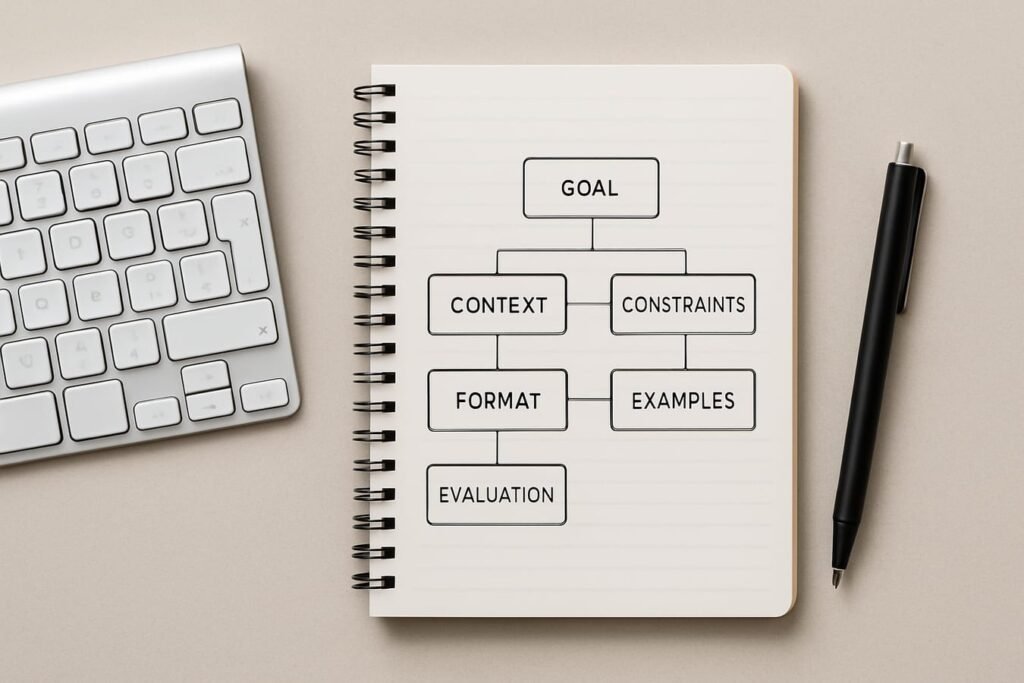
Think of a prompt like a short creative brief. You’re not “talking to a robot”; you’re commissioning work. The best prompts make it easy to do the right thing—and hard to do the wrong thing.
1) A crisp goal (what success looks like)
A goal is not a topic. “Write about cybersecurity” is a topic. “Write a 600-word explainer that helps small business owners choose between MFA apps and hardware keys” is a goal. The second one gives the model a target it can actually aim at.
- Weak: “Help me write a resume.”
- Stronger: “Rewrite my resume bullets for a product manager role, emphasizing measurable outcomes and leadership.”
2) Context (the facts the model shouldn’t have to guess)
Context is your unfair advantage. Without it, the model will fill the gaps with average assumptions—which is how you get bland, inaccurate, or misaligned output.
- Audience: who will read this?
- Situation: why now, what’s happening?
- Inputs: notes, messy draft, data points, constraints you already know
- Definitions: what terms mean in your organization or domain
If you’re worried about privacy, summarize sensitive details instead of pasting them verbatim. Prompts don’t need your entire inbox to be useful.
3) Role (the perspective and standards you want)
“Act as…” is not magic, but it can be a helpful shorthand for tone, priorities, and what the model should optimize for.
- Editor role: prioritize clarity, tighten structure, reduce fluff.
- Analyst role: surface assumptions, compare options, show tradeoffs.
- Teacher role: explain step-by-step, use simple examples, define terms.
A good role statement is specific about standards: “Be a skeptical reviewer who flags missing evidence” beats “Be an expert.”
4) Constraints (what to include, exclude, and avoid)
Constraints are where quality jumps. They prevent the model from wandering into irrelevant sections, wrong tone, or risky claims.
- Scope: what’s in and out (e.g., “focus on US audiences; exclude legal advice”).
- Length: word count, number of bullets, time to read.
- Tone: professional, candid, plain-language, not salesy.
- Prohibitions: no clichés, no made-up citations, no overconfident claims.
- Safety/accuracy: “If unsure, say you’re unsure; propose verification steps.”
5) Output format (so you don’t have to wrestle the result)
When people complain that AI outputs are “hard to use,” they’re often looking at a format mismatch. Ask for what you’ll actually paste into a doc, email, or slide.
- Headings and subheadings
- Bulleted action plan
- Table with defined columns
- Two versions: short and long
Format instructions also make evaluation easier: you can quickly see what’s missing.
6) Examples (the fastest way to calibrate tone and depth)
Examples do two jobs: they show the model your target style, and they clarify ambiguous instructions. Even a tiny example helps.
- Style example: “Use short paragraphs and concrete verbs like ‘reduce,’ ‘ship,’ ‘audit.’”
- Structure example: “For each option, include: who it fits, cost range, risks.”
If you have an existing paragraph you like, paste it and say: “Match this voice.”
7) Evaluation criteria (how to judge the output)
This is the overlooked part of prompt anatomy. If you tell the model how you’ll score the answer, it will usually steer toward those targets.
- Accuracy and uncertainty: calls out what may be wrong or needs confirmation
- Completeness: covers the must-have points
- Usefulness: includes next steps, not just explanation
- Readability: avoids jargon, uses scannable structure
Tradeoffs that matter: detail vs flexibility, creativity vs predictability
High-quality prompting is a balancing act. More detail increases reliability, but it can reduce surprising ideas. More openness can unlock creativity, but it also invites rambling. The goal is not “long prompts.” It’s appropriate specificity.
When to tighten the prompt
- You’re producing something public-facing (website copy, press statements, policies).
- You need consistent structure across multiple outputs.
- You’re working with sensitive topics where overconfidence is dangerous.
- You’re asking for comparisons, prioritization, or decisions.
When to loosen it (on purpose)
- You want a wide idea search before narrowing.
- You’re exploring a new topic and don’t know the constraints yet.
- You’re looking for alternative framings, names, hooks, or metaphors.
Editorial callout: If you’re not sure which route to pick, start with an iterative prompt. Ask for (1) clarifying questions and (2) a proposed outline. It feels slower, but it often cuts total time in half by reducing revision loops.
A weak prompt, upgraded three ways (so you can feel the difference)
Here’s a common request that produces mushy results:
Weak prompt: “Write a proposal for using AI in our customer support.”
Upgrade #1: Quick but clearer
Prompt: “Draft a one-page proposal to introduce AI-assisted customer support for a mid-sized SaaS company. Focus on benefits, risks, and a 30-day pilot plan. Use a professional tone.”
What improves: clearer audience, scope, and format.
Upgrade #2: Structured for reliability
Prompt: “Write a one-page internal proposal for AI-assisted customer support.
Context: Mid-sized SaaS; 12 agents; main channels are email and chat; top issues are onboarding and billing.
Must include: 3 use cases, 5 risks with mitigations, data/privacy considerations, and success metrics for a 30-day pilot.
Constraints: Avoid vendor names; no guaranteed claims; use bullets for risks and metrics.
Output: Headings: Summary, Use Cases, Risks & Mitigations, Pilot Plan, Metrics.”
What improves: fewer assumptions, more usable structure, safer claims.
Upgrade #3: Iterative to reduce rework
Prompt: “Before writing the proposal, ask up to 8 clarifying questions about goals, constraints, and compliance. Then propose an outline. After I answer, write the final one-page proposal.”
What improves: you force alignment before the model commits to a direction.
The prompt editor’s checklist (copy, paste, and use)
When an output disappoints, don’t throw away the whole prompt. Diagnose what’s missing. This checklist helps you make targeted edits.
- Goal: Is the deliverable explicit (what you’ll do with the output)?
- Audience: Did you name who it’s for and what they care about?
- Inputs: Did you provide the key facts, constraints, and definitions?
- Role: Did you specify standards (skeptical reviewer, concise editor, strategist)?
- Constraints: Did you set boundaries (scope, length, tone, exclusions)?
- Format: Did you request headings, bullets, tables, or multiple versions?
- Examples: Did you show one “good” sample line or structure?
- Evaluation: Did you state what “good” means (accuracy, completeness, actionable steps)?
- Verification: Did you ask it to flag uncertainty and suggest what to check?
Common failure modes—and the fastest fixes
Most prompting problems repeat. The fix is usually one sentence added in the right place.
Failure: “It’s too generic.”
- Add a specific audience and use case.
- Add 3–5 must-include points.
- Provide one paragraph of your own notes for grounding.
Failure: “It sounds confident but I don’t trust it.”
- Add: “If you’re not certain, say so and explain what would confirm it.”
- Ask for assumptions explicitly: “List assumptions you’re making.”
- Request a verification checklist instead of citations you can’t validate.
Failure: “It didn’t follow the format.”
- Specify a rigid structure (exact headings, bullet counts).
- Move format requirements to the end under a bold “Output format” label.
- Ask for “Draft A (strict format)” and “Draft B (more flexible).”
Failure: “It missed the point.”
- Rewrite the first line as a success statement: “This is successful if…”
- Ask it to restate the task in its own words before answering.
Building prompts that age well: from one-offs to a personal library
Once you have a prompt that works, treat it like an asset. Save it, name it, and make the variables obvious so you can reuse it without rewriting from scratch.
- Turn it into a template: replace specifics with fields (Audience, Goal, Constraints).
- Add a “defaults” line: your standard tone, length, and formatting.
- Keep a short “inputs needed” list: what you must provide for good results.
- Version it: a creative version and a strict version, depending on the task.
If you’re thinking longer-term about how these workflows reshape writing and decision-making at work, the broader conversation in the future of AI category can help you place prompting in context—what’s stable, what’s changing, and what’s worth learning deeply.
FAQ: The Anatomy of a High-Quality AI Prompt
How long should a high-quality prompt be?
As long as it needs to be to remove expensive ambiguity. For low-stakes tasks, a few sentences can be enough. For anything you’ll publish, send to leadership, or base decisions on, a structured prompt with context and constraints is usually worth the extra minute.
Do I need to use “Act as…” roles?
No, but they’re useful shorthand when you tie them to standards. “Act as a skeptical editor who cuts fluff and flags unsupported claims” is actionable. “Act as an expert” is vague and often changes nothing.
What’s the single most important prompt component?
A clear goal—what you want to end up with. If the model can’t tell whether you want an outline, an email, a comparison, or a recommendation, it will often produce a generic hybrid that feels “off.”
How do I get more accurate answers?
You can’t prompt your way into guaranteed correctness, but you can raise the floor: provide grounded inputs, ask it to list assumptions, request uncertainty flags, and ask for a verification checklist (what to confirm and where). For critical topics, verify with authoritative sources.
Should I include examples in every prompt?
Not always, but examples are one of the highest leverage additions when tone or formatting matters. Even a single “model paragraph” or a sample bullet style can drastically improve alignment.
What’s a good next step after reading this?
Pick one task you do weekly—status update, meeting recap, email reply, content outline—and write two prompts for it: a quick version and a structured version. Run them against the same input, compare results, then save the winner as a template with fill-in fields.