The biggest misunderstanding about “good prompts” is that they’re about clever wording. They’re not. Better prompts are mostly about better specifications: what you want, what you’re working with, what “good” looks like, and what the model should avoid.
If you’ve ever typed something like “Write a professional email” and received a bland template that doesn’t fit your situation, that’s not because the AI is stubborn. It’s because you handed it a goal with no boundaries. The model filled in the missing pieces the only way it can—by guessing the most generic version.
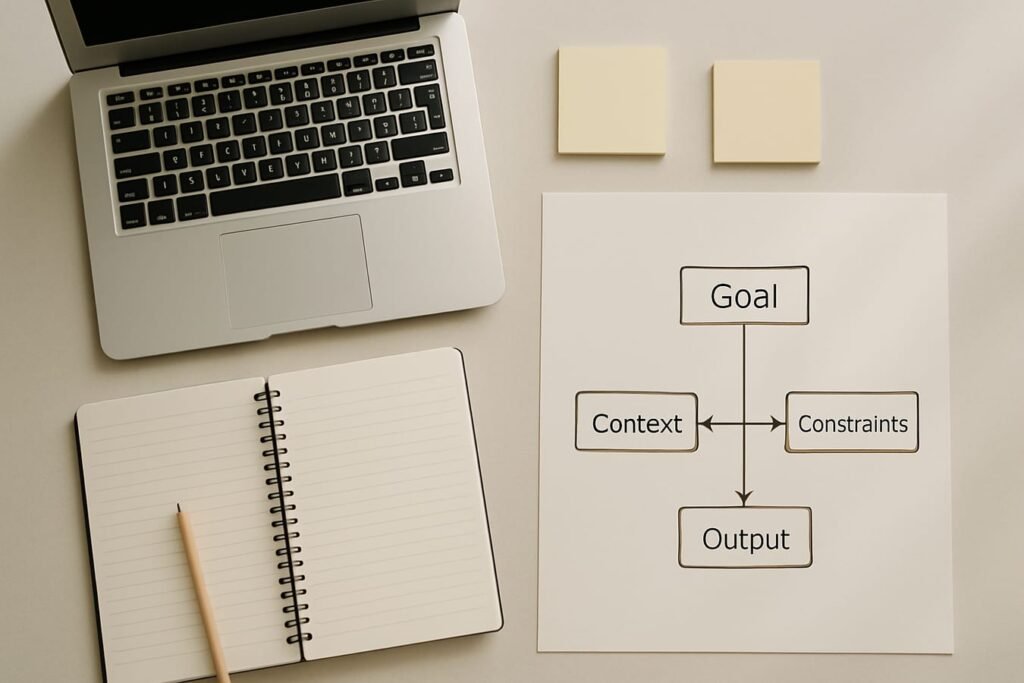
This article gives you a simple framework you can reuse for almost any task. It’s designed for general readers, not engineers, and it comes with examples, a repair checklist, and a few prompts you can keep in your notes app.
Why AI outputs go generic (and how prompts fix it)
Most “bad” results come from one of these gaps:
- Missing context: The AI doesn’t know who you are, who the audience is, or what happened before this moment.
- Unclear success criteria: You didn’t define what a good answer should include (or exclude).
- No format constraints: The model picks a default structure—often a fluffy paragraph or a list that doesn’t match your use case.
- Ambiguous scope: You asked for “ideas” or “research” without setting boundaries (industry, geography, budget, time horizon, assumptions).
- Too many tasks at once: The prompt bundles planning, writing, editing, and strategy; the output becomes shallow everywhere.
Prompting well is basically preventing the model from guessing. When you supply the missing pieces, you get answers that sound less like a template and more like work you can actually use.
A simple prompt framework that works (and scales)
Use this as your repeatable structure. You don’t need every component every time, but the more “expensive” the task (high stakes, public-facing, time-consuming), the more of these you should include.
1) Goal: what you want, in one sentence
Be specific about the outcome, not just the topic.
- Weak: “Help me with a presentation.”
- Better: “Create an outline for a 7-minute presentation that persuades our team to adopt weekly customer interviews.”
2) Context: the situation and audience
Include the practical details the AI can’t infer: who this is for, what has already happened, and what constraints exist in the real world.
- Audience (role, familiarity level, objections)
- Setting (email to a client, internal memo, social post)
- What you’ve tried already (so it doesn’t repeat it)
3) Inputs: the raw material to work with
Paste what you have: notes, bullet points, product details, requirements, a draft, meeting transcript snippets, or a link summary (if you have it). The model can’t use data you didn’t provide.
If you can’t paste everything, summarize the key facts and list what is unknown. That reduces confident-sounding hallucinations.
4) Constraints: what to include, exclude, and avoid
Constraints are where prompts become reliable. Add:
- Scope boundaries: what’s in/out
- Style requirements: tone, reading level, brand voice
- Length: word count, number of bullets, number of options
- Risk limits: “Don’t invent statistics; flag uncertainty; ask me if something is missing.”
5) Output format: the container for the answer
If you want something usable, tell the model the exact shape you need: a table, an outline, a checklist, three options with pros/cons, or a final draft plus subject lines.
Format is leverage: a good format prevents rambling and makes it easier to evaluate quickly.
6) Quality bar: what “good” looks like
This is an underrated line that changes everything. Examples:
- “Make it specific to a mid-size SaaS company; avoid generic advice.”
- “Use concrete examples; no buzzwords.”
- “If there are multiple valid approaches, show the top 3 and recommend one.”
Editorial callout: Prompting is a briefing skill.
Treat the AI like a capable contractor. If your “brief” would confuse a human, it will confuse the model too. The fastest path to better outputs is to clarify the brief—not to hunt for secret phrases.
Prompt framework in practice: a fill-in template
Here’s a reusable skeleton. Copy it and delete what you don’t need.
- Goal: [What you want created/decided, and why]
- Audience & context: [Who it’s for, situation, constraints]
- Inputs: [Facts, bullet points, draft text, requirements]
- Constraints: [What to include/exclude, tone, length, must-avoid]
- Output format: [Outline/table/draft + sections]
- Quality bar: [What good looks like; how to handle uncertainty]
Weak vs. strong prompts: what changes, exactly
| Component | Weak prompt (forces guessing) | Strong prompt (reduces ambiguity) | Why it matters |
|---|---|---|---|
| Goal | “Write a LinkedIn post about leadership.” | “Draft a LinkedIn post that argues for ‘fewer meetings, clearer decisions’ and offers 3 actionable habits.” | Defines a point of view, not just a topic. |
| Context | None | “Audience: new managers in tech; tone: candid, not cheesy; assume they’re busy.” | Prevents mismatched tone and level. |
| Inputs | None | “Use these notes: [3 bullets]. Don’t add statistics.” | Anchors the output in your reality. |
| Constraints | “Make it engaging.” | “120–180 words. No hashtags. Avoid ‘game-changer’ and ‘leverage’.” | “Engaging” is subjective; constraints are testable. |
| Format | Any | “Start with a contrarian first line, then 3 bullets, then a 1-sentence close.” | Gives you something scannable and publishable. |
| Quality bar | None | “Make it specific; include one concrete example scenario.” | Pushes beyond generic advice. |
Four practical examples you can steal
Each example shows the same framework, tuned to a real-world task. Replace the bracketed parts with your details.
Example 1: A professional email that doesn’t sound like a template
Prompt: Goal: Draft a professional email to reschedule a project kickoff without damaging trust.
Context: I’m the project lead at a small agency. Recipient is a client marketing director. We need to move the meeting from Thursday to next Tuesday due to a vendor delay. They’re already anxious about timeline.
Inputs: Original date/time: Thu 2pm ET. Proposed options: Tue 10am ET or Wed 3pm ET. Reason: waiting on final brand assets; we can still share draft agenda now.
Constraints: Keep it under 140 words. Own the change, don’t over-explain. No excuses. Offer two options and a clear next step.
Output format: Subject line + email body.
Quality bar: Warm, confident, specific; avoids corporate filler.
Example 2: Summarize a document with the right depth
Prompt: Goal: Summarize the following notes into an executive brief I can paste into Slack.
Context: Audience is a cross-functional team (product, support, sales). They need the “so what” and decisions required.
Inputs: [Paste meeting notes or bullets].
Constraints: 8–12 bullets max. Include: key insights, risks, open questions, and next actions. Don’t invent numbers; if something is unclear, flag it as “Unknown.”
Output format: Headings: Insights / Risks / Decisions Needed / Next Steps.
Quality bar: Practical and concrete; no generic management language.
Example 3: Brainstorm ideas that fit your constraints (not the internet’s)
Prompt: Goal: Generate 15 blog topic ideas that can realistically be written in 2–3 hours each.
Context: Audience is US-based small business owners. Topic area is customer retention for local service businesses (cleaning, landscaping, home repair).
Inputs: We already published: “How to ask for reviews,” “Referral program basics.”
Constraints: Avoid repeating existing topics. Each idea must include a working title, a 1-sentence angle, and one example or mini-case. No jargon.
Output format: Table with columns: Title / Angle / Example / Difficulty (Easy-Med).
Quality bar: Ideas should be specific enough to outline immediately.
Example 4: Make a decision with trade-offs (not just a list)
Prompt: Goal: Help me choose between three options and recommend one with clear reasoning.
Context: I’m selecting an AI tool for drafting internal SOPs. Team of 6. Priority is accuracy and consistency; budget is limited.
Inputs: Options: Tool A, Tool B, Tool C. Requirements: exports to Google Docs, allows templates, supports team collaboration.
Constraints: Don’t assume features not stated; if a feature is unknown, list it as a question to verify. Include risks and a rollout plan for the recommended option.
Output format: Comparison table + recommendation + 7-day adoption checklist.
Quality bar: Specific, cautious, and decision-oriented.
The iteration trick: how to “repair” a mediocre output
Even strong prompts sometimes land slightly off: wrong tone, missing nuance, too long, too generic. The fix is rarely “start over.” It’s targeted iteration.
Use small follow-ups that change one variable at a time:
- Tone repair: “Rewrite with a calm, direct tone. Remove hype and remove exclamation points.”
- Specificity repair: “Add one concrete example scenario and one common pitfall. Keep the length the same.”
- Structure repair: “Reformat as: 1) context, 2) key points, 3) recommended next steps.”
- Accuracy guardrail: “Highlight any statements that may be assumptions. Ask me questions where you need facts.”
- Compression: “Cut this by 40% without losing any key facts. Keep all action items.”
A practical checklist for better prompts (save this)
Before you hit enter, scan your prompt and confirm the essentials. This takes 20 seconds and can save 20 minutes.
- Goal: Did I state the outcome and purpose in one sentence?
- Audience: Did I specify who it’s for and what they care about?
- Inputs: Did I paste the key facts, data, or draft text?
- Boundaries: Did I state what to avoid (claims, tone, topics, assumptions)?
- Format: Did I ask for the exact structure I need?
- Length: Did I give a word count, bullet count, or time limit?
- Quality bar: Did I define what “good” means (specificity, examples, decision-ready)?
- Verification: Did I ask it to flag uncertainty rather than invent details?
Common prompt mistakes (and fast fixes)
Mistake: “Make it better” without saying what better means
Fix: Name the dimension: clarity, concision, persuasion, friendliness, specificity, or structure. Example: “Make this 20% shorter and more direct; keep the key promise and the deadline.”
Mistake: Asking for “research” without sources or boundaries
Fix: Request a staged output: first a list of questions and assumptions, then a draft. If accuracy matters, ask for uncertainty to be labeled and facts to be verifiable.
Mistake: One mega-prompt that tries to do everything
Fix: Split into steps: outline first, then draft, then edit. You’ll get cleaner thinking and fewer contradictions.
Mistake: No examples of your preferences
Fix: Provide a tiny “style sample”: “Write like this: short sentences, no buzzwords, one metaphor max.” Or paste two sentences you like and ask it to match them.
Where to go next: build a tiny prompt library
Once you’ve used the framework a few times, you’ll notice patterns: you keep asking for the same outputs (emails, summaries, outlines, social posts). Save your best prompts as templates and tweak the inputs each time. If writing is a major use case, browse these content writing prompts and adapt the structure to your own voice and constraints.
FAQ
What’s the single most important part of a good AI prompt?
Constraints—because they stop the model from guessing. A clear goal helps, but constraints (what to include, exclude, and how to format) are what make the output consistently usable.
Do I need to assign a “role” like “You are a lawyer” or “You are a marketer”?
Sometimes, but it’s optional. A role is helpful when it sets a clear perspective and standards (e.g., “act as an editor who trims fluff and enforces structure”). It’s less helpful when it tries to substitute for real details. If you use a role, pair it with context and inputs.
Why does the AI make up details I didn’t give it?
Language models are designed to produce plausible text, not guaranteed truth. When information is missing, they may fill gaps with likely-sounding content. Reduce this by providing inputs, asking it to flag assumptions, and explicitly instructing it not to invent statistics, quotes, or citations.
How long should my prompt be?
As long as it needs to be to prevent guessing—no longer. For low-stakes tasks, a short prompt with a clear format is often enough. For high-stakes writing (client communications, policies, public posts), a longer prompt with context, constraints, and a quality bar is worth it.
What if I’m not sure what I need yet?
Use the model to clarify the brief first. Ask for: (1) the key questions it needs answered, (2) a proposed outline, and (3) 2–3 options with trade-offs. Once you pick an option, provide the missing details and request the final draft.
How do I get outputs that match my brand voice?
Give a short style guide: tone (e.g., “plainspoken, confident”), “dos and don’ts” (words to avoid), and one sample paragraph you like. Then ask it to mirror those choices while keeping your facts unchanged.